
How to Edit PDF on Mac
Is There a Built-In PDF Editor Available on Mac? Mac users have access to a built-in PDF editor called Preview. Preview is a versatile application that allows users to view, edit, and annotate PDF files. With Preview, you can add and edit text, highlight, underline, and strikethrough text, add annotations and comments, fill out PDF forms, resize and rearrange PDF pages, and perform other editing tasks. Different PDF Editors Available on Mac Adobe Acrobat Pro DC Adobe Acrobat Pro DC is a professional-grade PDF editor that offers a comprehensive set of PDF tools for creating and editing PDF files....
How to create a fillable PDF form template using only free tools
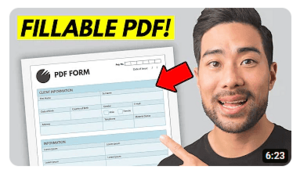
Finding and downloading a form template from Canva After creating a free account, please log into Canva, and search for a Canva template design as indicated in the image below. In this guide, we'll be searching for A4 document-based templates. Other sizes such as US Letter are also available. As Canva is a design tool that goes far beyond form templates, all kinds of design templates are available such as presentations, videos, and social media posts. You can also create a Canva template entirely from scratch by using the whiteboard option. Choosing A4 document templates After selecting the A4 document...
Viewing PDFs: What to do when your PDF document won’t open

Let’s get down to the nitty gritty of why PDFs sometimes won’t open properly. Why can’t you access PDF files? Here are some common reasons why you may not be able to view PDF files along with quick fixes that could solve your PDF viewing issues: You don’t have a PDF reader installed If you’re having trouble opening a PDF file, your issue could be as simple as your computer not having a PDF reader downloaded. This could be the case if you just got a new computer. It could also be a result of installing or uninstalling updates on...
Five Situations Where Merging PDF Files Will Make Your Life Easier

A good Merge PDF tool comes in handy in more ways than most realise. Here are five situations that you might find yourself in where merging files can save time and aggravation for you, your colleagues, clients, family and friends: Print a variety of different file types Situation #1: Your boss sends you four Excel spreadsheets, three Word documents and two JPG pictures and casually asks you to print them for a meeting with a client in 15 minutes. The spreadsheets are a mess. The documents have funky spacing settings. The images are bigger than a standard sheet of paper....
11 Unexpected Uses for PDFs That Help You Win at Life
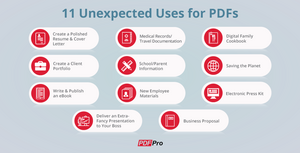
Ways to use PDFs in your daily life Here's 11 ways to use PDF to share important information, protect your work and save the planet. Create a Polished Resume & Cover Letter Just graduated? Looking for a new job? Then you'll need a presentation that impresses. Write, format and proofread your resume in Word, then convert Word to PDF. They're easy to send through email, and because PDF files appear the same on all devices, you know they'll receive an accurate, well-formatted copy. For a modern, visual option, look into infographic resume templates. For these, you'll usually end...
How to fill out and sign a PDF form online
The most important considerations when choosing an online PDF editor are (1) ease of use, (2) breadth of features and (3) pricing. While there are many different companies offering online PDF tools, not all of them are equal. If you're looking for a simple, free PDF editor - or even a tool that only provides the option to sign PDF files and download - there's still some things you should consider before you make a choice. Some PDF editors have a very limited list of features or have difficult-to-use interfaces filled with advertisements. Others offer very limited trials that limit...
The 5 ways to edit a PDF file
Writing on a PDF and lighter touch-ups For activities such as: Limited text edits Adding text, signatures, symbols, shapes, or images Adding annotations such as comments and highlights Filling out a PDF form You should consider using a free desktop PDF reader or a freemium online PDF editor. In the case of both products, changes to a PDF are limited to what the user can add on top of the PDF file. After saving the file, the edits that the user adds on top of the file are applied to the original PDF that lies underneath. In order to make...
